

Watch how
Use GlobalHostia in Claude
Illustrative walkthrough: connect GlobalHostia from the Claude connectors directory, then manage domains, DNS, email, invoices and support tickets in plain words.
Still stuck?
Our engineers answer around the clock. Tell us what you see and which domain or service it is about.
More how-tos
-
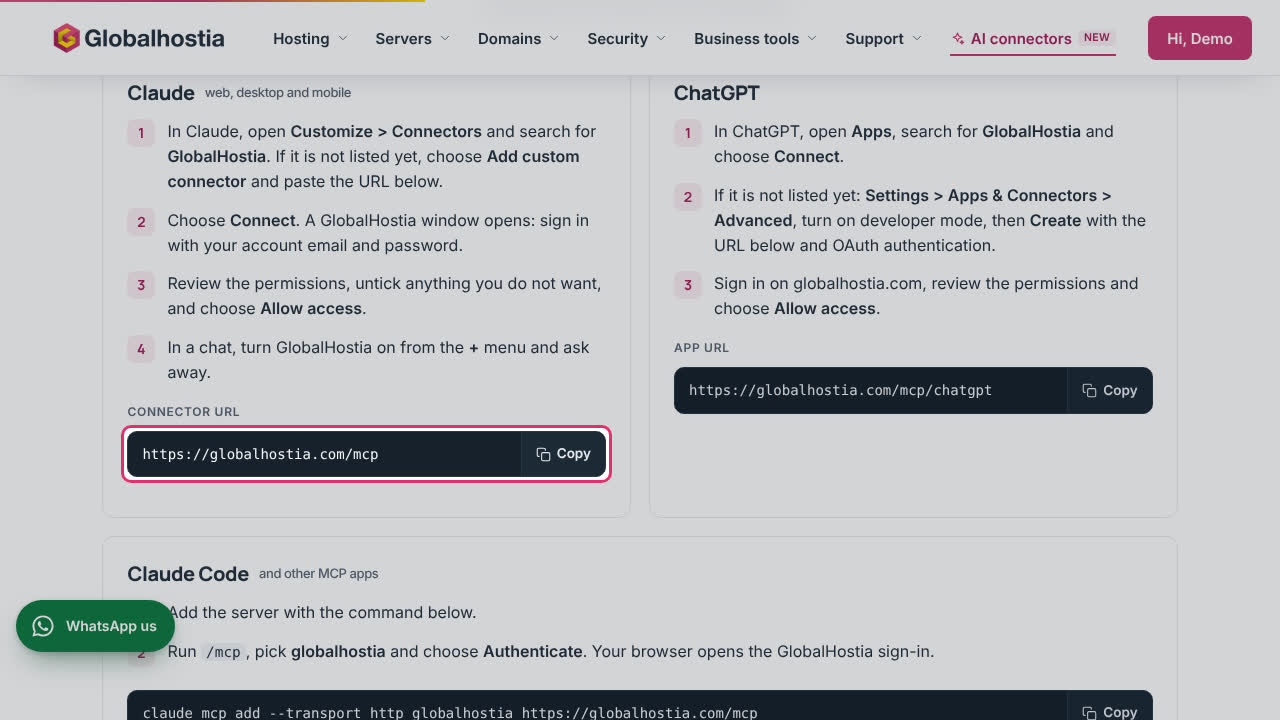 Step by step
AI assistantsManage your hosting from Claude or ChatGPTAdd the GlobalHostia connector to your AI assistant, approve it once, and manage or disconnect it from your account.
-
 1:31
AI assistantsUse GlobalHostia in ChatGPTConnect GlobalHostia to ChatGPT, then check domains and services, change DNS, check email setup, see invoices and open tickets in plain words.
-
 0:45
AI assistantsAsk our AI which plan or package you needThe AI assistant asks a few short questions first, then recommends a plan, or a Business package for a team with the reason in your own words, and Talk to sales.